

Photos capture moments, but when those moments are tainted by unwanted noise and grain, the beauty can be compromised. Clear images allow for more accurate interpretation and appreciation. Noise can mask details, degrade aesthetic appeal, and, in severe cases, make the image unusable.
Thanks to artificial intelligence, we now have an innovative solution to reduce noise and improve image quality online. This article will give you a closer look at imglarger AI Image Denoiser, a quick and fast noise remover app to make your images clean and clear.
Why Noise in Our Photos
Image noise refers to random variations of brightness or color information in photos, often manifesting as grain or specks that degrade image clarity. Several factors can introduce noise: low-light conditions, high ISO settings in cameras, electronic interference, or even during the image transmission process.
Imglarger AI Image Denoiser: A Quick Overview
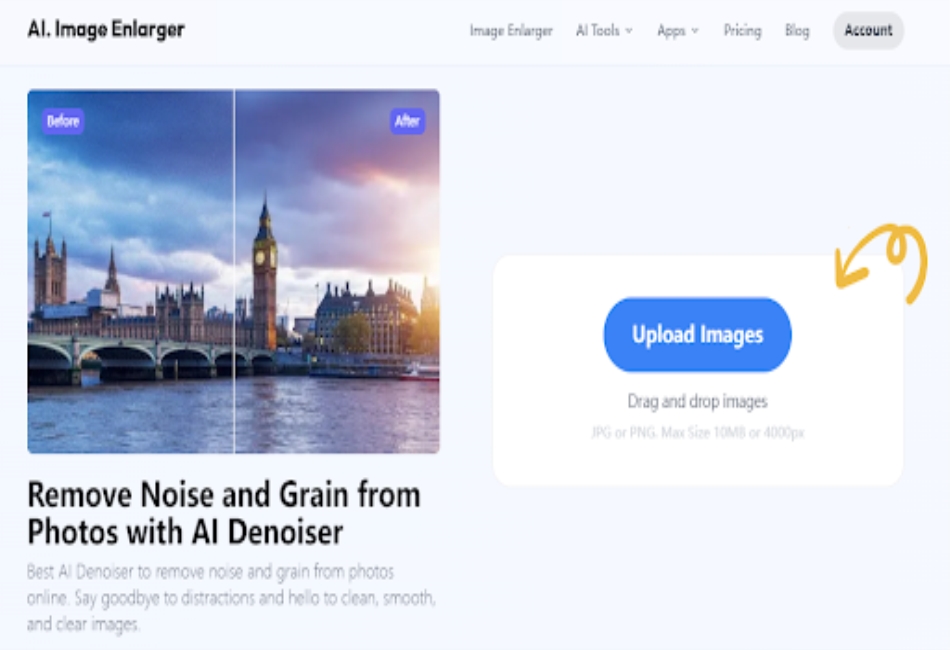
In the age of digital photography, while capturing an ideal shot is everyone’s goal, unwanted noise can often cloud an otherwise perfect moment. Imglarger AI Image Denoiser is here to rescue those precious memories.
AI Image Denoiser is one of the best photo enhancement features to increase your image clarity with one click. Harnessing the power of artificial intelligence, AI Image Denoisers can analyze and differentiate between the essential details of an image and unwanted noise. The system effectively ‘learns’ from thousands of images, enabling it to target and eliminate the undesired grain without compromising the photo’s integrity.
How Does Imglarger AI Denoiser Work?
Imglarger uses deep learning models that are trained on vast datasets. These models can discern patterns and differentiate between noise and actual image data, thus selectively reducing noise while preserving image sharpness.
Understanding Noise:
Before eliminating it, the AI system first understands the noise patterns in an image. These could be random specks of color, grainy patches, or blurry sections, often caused by a camera’s low light or high ISO settings.
Targeted Approach:
Unlike traditional denoising tools that apply a general filter over the whole image, the AI differentiates between actual image details and noise. This means only the noise is tackled, leaving the essential details untouched.
Preserving Image Details:
One common issue with denoising is the loss of image sharpness. The Imglarger AI ensures that the sharpness and intricate details remain intact while the noise is removed.
Handy Tutorial of Noise Reduction by Imglarger
Step 1: Choose AI Image Denoiser
Navigate to the platform and choose “AI Image Denoiser” option from the drop-down menu of the AI Tools. Once you select this tool, imglarger will take you to the specific tool page where you can get started with noise reduction.
Step 2: Upload Your Noisy Image
Click on the upload button, and select your noisy image. You can upload both PNG and JPG files with a maximum size of 5MB. Another way to upload the image is by dragging or dropping the image from your computer directly.
Step 3: Start Removing Noise
Once the image is ready to be processed, click the ‘Start” button to let imglarger AI Image Denoiser to show its magic. With only a few seconds, you can eliminate unwanted noise and get a higher-quality image for other uses. Besides, imglarger also offers an editing tool that allows you to make some basic edits before noise reduction, which can also help you enhance image quality.
Step 4: Download the result
After removing the noise from your image, click the “download” button to save the final result to your computer. The outcome will be high-quality and without any watermarks on it. Feel free to view, share, and use the processed image in any cases.
Benefits of Using Imglarger AI Denoiser
Superior Image Clarity
At its core, Imglarger AI Image Denoiser excels in delivering crisp, clear images. By intelligently targeting and eliminating noise, it ensures that the photos retain their original beauty and charm, free from grainy distractions. This results in pictures that are more detailed and visually appealing.
Preservation of Essential Details
One of the pitfalls of many denoising tools is the inadvertent removal of vital image details, leading to a blurred or smudged appearance. Imglarger’s AI-driven approach is meticulous, differentiating between genuine image details and unwanted noise. This ensures that while the noise is removed, the core elements of the image remain sharp and intact.
User-Friendly Experience
Ease of use is a hallmark of this noise reduction app. Designed with users in mind, the interface is intuitive and straightforward. This means even those new to image editing can achieve professional-level results without steep learning curves or technical challenges.
Continuous AI Learning and Improvement
Built on an AI framework, the denoiser doesn’t remain stagnant. As more images are processed, the AI continues to learn, refine, and improve its denoising techniques. This adaptive learning ensures that users consistently get top-notch results, benefitting from the latest advancements in AI image processing.
Imglarger AI Image Denoiser Real-life Applications
From restoring old memories to capturing the serenity of the night sky, the applications are as vast as they are impactful. So, let’s journey into the world of AI Image Denoising and discover the myriad ways it’s reshaping visual narratives.
- Night Sky Photography: Want to capture the beauty of the Milky Way but end up with grainy images? Use the denoiser to emphasize stars and not noise.
- Indoor Events: Indoor lighting can be tricky, especially at weddings or parties. The denoiser helps in retaining the mood without the accompanying noise.
- Old Photographs: Have old family photos that have degraded over time? Breathe new life into them by eliminating grain and age-related noise.
- Mobile Photography: Not everyone has a high-end camera. The denoiser can be a game-changer for those who rely on mobile phones, where low-light performance might not be ideal.
- Wildlife at Dusk or Dawn: Animals are most active during these times, but the light might not be perfect. Capture the beauty of nature without the noise interference.
Wrapping Up | Make Image Clean with Imglarger AI Denoiser
Imglarger AI Image Denoiser isn’t just a tool to remove noise from an image; it’s a companion for every photography enthusiast. Whether you’re a professional aiming for the perfect shot or someone trying to preserve memories in their best form, this tool ensures your images portray only the beauty minus the noise. With its AI-driven approach, image enhancement has never been so intelligent and efficient. Give it a try and witness the transformation.
